If you’ve ever stood in front of a weighing station—whether it’s a grocery store checkout, a logistics warehouse loading dock, or a lab’s precision scale—you’ve probably glanced at the display and thought, How big does this need to be? It’s a question that comes up again and again, especially for people who are tasked with ordering weighing indicators, troubleshooting existing equipment, or just making sure every operator can read measurements without error. As a supplier of weighing indicators, I’ve fielded this question hundreds of times, and the answer isn’t as simple as “bigger is better.” Let’s break down what actually determines a weighing indicator’s display size, why it matters, and how to pick the right one for your needs. Weighing Indicator
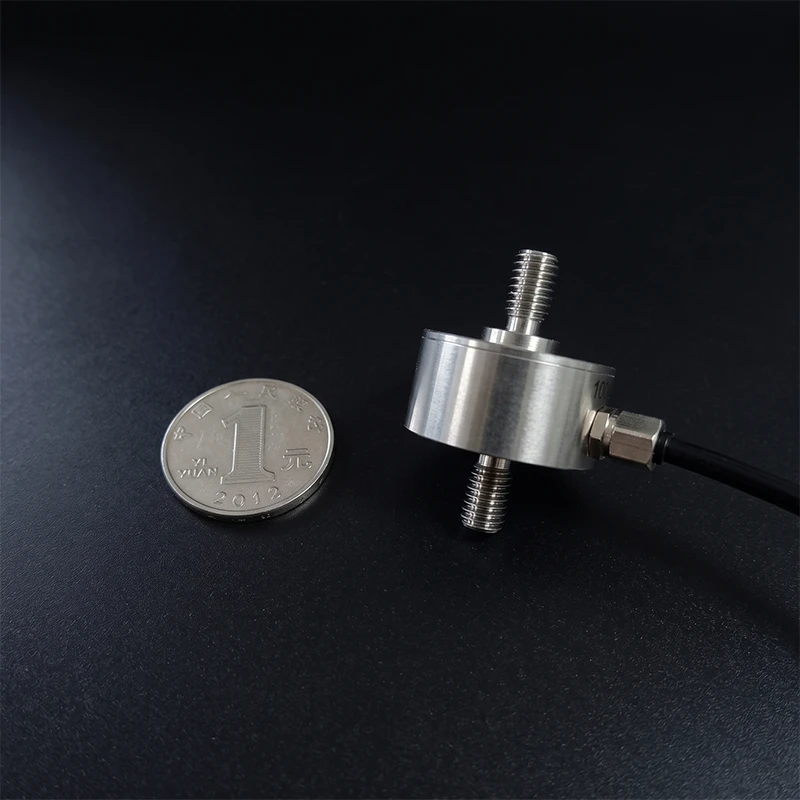
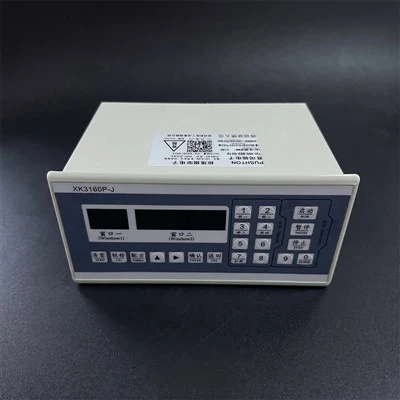
First, let’s define what a weighing indicator display actually is. It’s not just a random screen; it’s the interface that translates the load cell’s raw electrical signal (the amount of weight applied to the scale) into a readable number. Most basic indicators use LED (light-emitting diode) displays, while more advanced industrial ones use LCD (liquid crystal display) or even touchscreen panels for extra functionality. The “size” we talk about here isn’t just the diagonal measurement of the screen—though that’s a part of it—it’s the height, width, and brightness of each digit, the number of digits displayed, and the viewing angle, all of which come together to make the measurement legible.
A common misconception I run into is that a 10-inch display is always better than a 5-inch one. But that’s not true. A small, high-contrast display with digits that are 1 inch tall will be easier to read from 10 feet away than a 7-inch display with digits that are only 0.5 inches tall. The key spec here is digit height, not overall screen size. Industry standards, like those set by the National Type Evaluation Program (NTEP) in the U.S., outline minimum visibility requirements for different weighing applications. For example, retail scales used in grocery stores (which are NTEP-approved) need digits at least 0.5 inches tall to be read from 3 feet away, where a customer might be standing at the checkout. For industrial scales on a loading dock, where an operator might be 15 feet away when taking a reading, NTEP or similar standards in the EU (from the International Organization of Legal Metrology, OIML) recommend digits at least 1.5 inches tall. That’s where the actual display size comes from—it’s tailored to the viewing distance, not a one-size-fits-all number.
Let’s get into the science of why digit height matters. When light hits the human eye, it’s focused onto the retina, where photoreceptors (rods and cones) process the image. To distinguish between two digits (like a 0 and an 8, which have similar shapes), the brain needs to resolve a certain amount of detail. For a digit viewed at a distance, the detail shrinks, so the digit itself has to be larger. If a digit is too small, operators will squint, misread weights, or even make safety errors—like loading a truck with too much weight because they couldn’t see the scale reading clearly. I once had a customer in the construction industry who switched from a small 0.75-inch digit indicator to one with 1.75-inch digits after an accident: a driver missed a 10,000-pound overage because the digits were too far away, leading to a $5,000 fine and a week of downtime. That experience stuck with me, and it’s a perfect example of how display size directly impacts operational safety and cost.
Another factor is the number of digits. Most basic weighing indicators display 6 to 8 digits, but some heavy-duty industrial indicators can have 10 or more. For a scale that measures up to 100,000 pounds with a 1-pound graduation, you need 6 digits to show 100,000 clearly. If your indicator only has 5 digits, you’ll get a false reading (it’ll cut off the last place). The display size has to accommodate these digits without crowding them. A 6-digit indicator with 1-inch digits will have a total width of around 8 inches (each digit plus a small gap between them), while a 10-digit indicator with the same 1-inch digits will be 13 inches wide. That’s a big difference if you’re mounting the indicator in a tight space, like a control panel in a factory where every inch matters.
Brightness also plays a role in display size. Outdoor applications, like scales used in farming or waste management, need displays bright enough to be seen in direct sunlight. An LED display with a brightness of 5,000 nits is standard for outdoor use, while indoor displays can be as low as 1,000 nits. Bright displays require more power, but they also need to be large enough to offset glare—even a bright 1-inch digit will be hard to see if the sun is shining directly on it, so many outdoor indicators use digit heights of 2 inches or more, even if the viewing distance is only 10 feet. For dark environments, like warehouses with low overhead lighting, a dimmer, smaller display can work, but you have to make sure there’s enough contrast between the digits and the background (usually black digits on a white background, or red digits on black) to avoid eye strain.
Touchscreen indicators, which are becoming more popular for integrated weighing systems, add another layer to the display size conversation. A 10-inch touchscreen might be necessary if you’re using the indicator to control multiple functions: inputting product codes, saving weight data, or connecting to a warehouse management system (WMS). But if you just need a basic scale to show weight, a 5-inch touchscreen is overkill, and it’ll take up more space on your counter. I’ve worked with e-commerce fulfillment centers that switched to touchscreen indicators because they could scan barcodes and log weights in one step, reducing the number of devices on their packing stations. For those, a 7-inch display was the sweet spot—big enough to tap buttons clearly, small enough to fit between the scale and the label printer.
Now, let’s talk about common mistakes people make when choosing a weighing indicator display size. The first is copying what a competitor uses. Just because a warehouse down the street has a 12-inch display doesn’t mean you need one. If your operators are 5 feet away from the scale, a 1-inch digit is more than enough, and a smaller display will save you money on the indicator and make it easier to mount. The second mistake is ignoring the mounting location. If your indicator is mounted above a dock door, where operators are standing below, you need a display that’s tilted downward and has a wide viewing angle—otherwise, even a large display will look small from below. Many industrial indicators have adjustable mounting brackets, so you can position the display to minimize glare and maximize visibility, but you still have to factor that into your size choice.
Another point to consider is future needs. If you’re growing your business and might need to add data logging or connectivity down the line, a larger display gives you room for extra features. A basic 6-digit LED indicator won’t have space for a touchscreen or Ethernet port, but a 10-inch LCD display can accommodate both. I always tell customers: if you’re not sure whether to go with a smaller or larger display, go slightly bigger than you think you need. It’s cheaper to get a slightly larger indicator upfront than to have to replace it a year later because your operations expanded.
Let’s look at a few real-world examples to make this concrete. A small retail bakery we supply uses a 4-inch indicator with 0.5-inch digits. Operators are standing 2 feet away, and they only need to measure up to 50 pounds with 0.01-pound precision. The small display fits on their counter next to the cash register, and customers can easily see the weight of their cake ingredients. A logistics company in Atlanta uses a 10-inch industrial indicator with 1.75-inch digits. Their loading dock operators are 12 to 15 feet away, and they need to measure weights up to 50,000 pounds. The large, bright display eliminates misreadings, and it’s mounted on a swivel bracket so it can be turned to face the driver for quick verification. A pharmaceutical lab, which needs extremely precise measurements (down to 0.001 grams), uses a 3-inch indicator with 0.25-inch digits. The lab technicians are standing 1 foot away, and the small, high-resolution display shows up to 6 digits, which is enough for their needs.
So, what’s the right display size for you? Start with these three steps: first, measure your typical viewing distance from the operator to the scale. Second, check any legal metrology standards that apply to your industry (NTEP, OIML, or local equivalents) to make sure your display meets minimum visibility requirements. Third, list the features you need: do you just need weight, or do you need data logging, touch controls, or connectivity? Once you have those numbers in hand, you can pick a display size that fits your needs without wasting money on extra space.
If you’re still not sure, that’s where we come in. As a supplier of weighing indicators, we work with businesses of all sizes—from small bakeries to large distribution centers—to match them with the right equipment for their specific use case. We can answer questions about digit height, display type, mounting options, and even help you calculate the right size for your operation. We don’t just sell parts; we help you avoid the costs of misreadings, downtime, and replacing equipment too soon.
Whether you’re looking to upgrade an old scale, outfit a new loading dock, or just make your weighing process more accurate, getting the display size right is a small detail that makes a big difference. Don’t let a tiny digit lead to a big mistake—reach out to our team today to discuss your weighing indicator needs, and we’ll help you find the perfect fit for your business.
Shear Beam Load Cell References
- National Type Evaluation Program (NTEP). (2023). “Weighing and Measuring Equipment Requirements.” U.S. National Institute of Standards and Technology (NIST).
- International Organization of Legal Metrology (OIML). (2022). “OIML R76: Non-Automatic Weighing Instruments.” OIML International Recommendations.
- Weighing Technology Association. (2021). “Best Practices for Display Visibility in Industrial Weighing.” WTA Industry Guidelines.
- Smith, J. (2020). “Human Factors in Weighing Equipment Design.” Journal of Industrial Ergonomics, Vol. 78.
Shandong Leheng Instrument Co., Ltd.
Shandong Leheng Instrument Co., Ltd. is one of the most experienced weighing indicator manufacturers and suppliers in China. With abundant experience, we warmly welcome you to wholesale durable weighing indicator in stock here from our factory. All customized products are with high quality and low price.
Address: 320 Meters North of the Intersection of Industrial Fifth Road and Planning Second Road, Economic Development Zone, Yunzhou Subdistrict, Yuncheng County, Heze City, Shandong Province, China
E-mail: hanyaoxian126@163.com
WebSite: https://www.lehengmeter.com/
